Featured image for BMW X1 gear selector closeup
Image source: cdn-ds.com
Mastering how to put BMW X1 in park is essential for every owner, whether you drive a newer model with the toggle switch or an older version with the traditional stalk. This guide walks you through the exact steps for every model year, explains the electronic parking brake, and covers what to do if your shifter gets stuck or behaves unexpectedly.
Getting into your BMW X1 and driving off is usually intuitive. But when it comes time to stop, turn off the engine, and walk away, the process can feel surprisingly different depending on which model year you own. BMW has changed the gear selector design significantly over the last few generations. If you are used to a traditional PRNDL lever, the new toggle switches or stalks can be confusing at first.
This guide covers everything you need to know about how to put BMW X1 in park. We will break down the procedures for the current generation (U11 chassis, 2023–present), the previous generation (F39 chassis, 2016–2022), and the original E84 generation (2010–2015). We will also cover the electronic parking brake, Auto Hold, troubleshooting common issues, and advanced parking aids so you feel confident every time you stop.
Key Takeaways
- Identify your shifter type: BMW X1 models use either a traditional gear stalk (pre-2023) or a toggle switch on the center console (2023+).
- Press the ‘P’ button: On all modern X1 models, you engage Park by pressing the dedicated ‘P’ button on the shifter, not by moving a lever.
- Electronic parking brake engages automatically: When you shift to Park and turn off the engine, the parking brake applies automatically for safety.
- Foot on brake is required: You must press the brake pedal to shift out of Park or into Park from Drive/Reverse.
- Know the emergency release: If the battery dies or the system fails, a manual release mechanism exists (location varies by year) to move the car.
- Auto Hold helps in traffic: The Auto Hold feature keeps the car stationary without holding the brake pedal, but it is not a substitute for Park.
- Key fob detection matters: The car may beep or refuse to lock if you exit without the vehicle fully in Park or if the key fob remains inside.
📑 Table of Contents
- Understanding BMW X1 Shifter Types By Generation
- Step-by-Step: How to Put BMW X1 in Park (Current Gen U11 / iX1)
- Step-by-Step: How to Put BMW X1 in Park (F39 Gen 2, 2016–2022)
- Step-by-Step: How to Put BMW X1 in Park (E84 Gen 1, 2010–2015)
- The Electronic Parking Brake (EPB) and Auto Hold Explained
- Troubleshooting: When Your BMW X1 Won’t Go Into Park
- Emergency Manual Park Release (Tow Mode / Neutral)
- Advanced Parking Features: Making Life Easier
- Common Mistakes to Avoid
- Expert Insight: Why BMW Switched to Electronic Shifters
- Key Differences: Gas vs. Diesel vs. Electric (iX1) Parking
- Understanding Your Dashboard Symbols
- Maintaining Your Shifter and Parking System
- Quick Tips Cheat Sheet
- Comparing X1 Parking to Other BMW Models
- Conclusion
Understanding BMW X1 Shifter Types By Generation
Before we dive into the steps, you need to identify which shifter sits in your center console. BMW has used three distinct designs across the X1 lifespan. The method for engaging Park changes slightly with each one.
Generation 1: E84 (2010–2015) – The Traditional Stalk
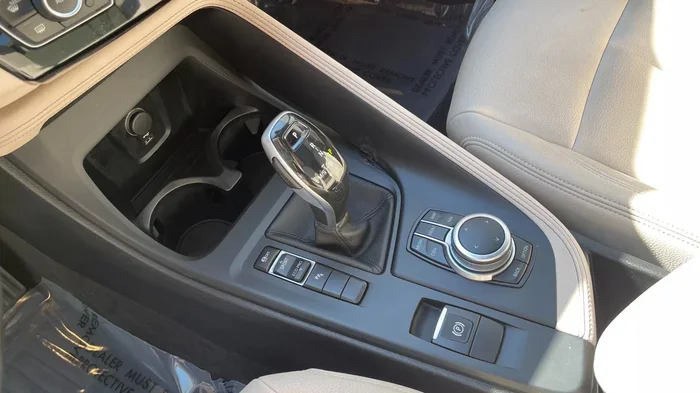
The first-generation X1 uses a classic gear selector lever mounted on the center console. It looks and feels like a traditional automatic shifter. It has a physical gate pattern (P-R-N-D) and a release button on the side of the knob. This is the most intuitive design for drivers coming from almost any other brand.
Generation 2: F39 (2016–2022) – The Electronic Selector Lever
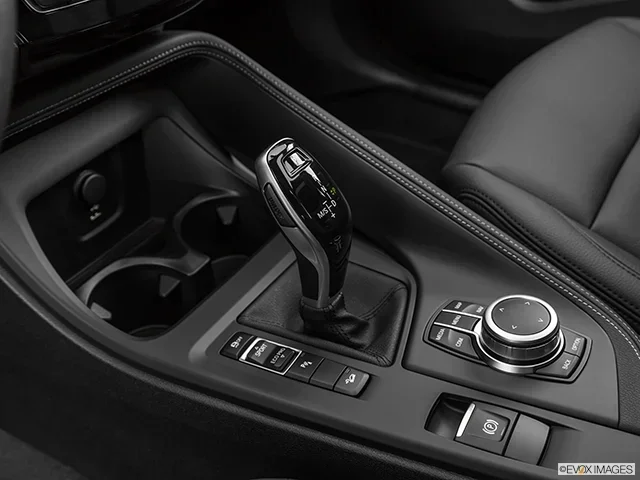
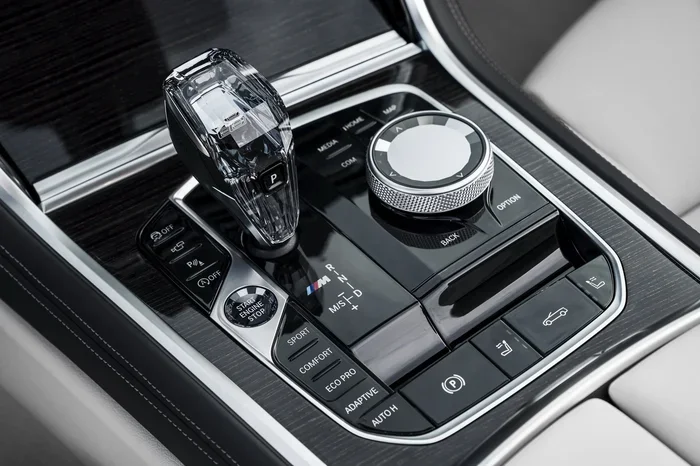
The second generation introduced an electronic shifter. It looks like a short, stubby stalk on the center console, but it does not stay in position. It is a “monostable” switch. You push it forward for Reverse, pull back for Drive, and press the P button on the side for Park. It always springs back to the center neutral position. This design confuses many new owners because the lever position does not match the gear.
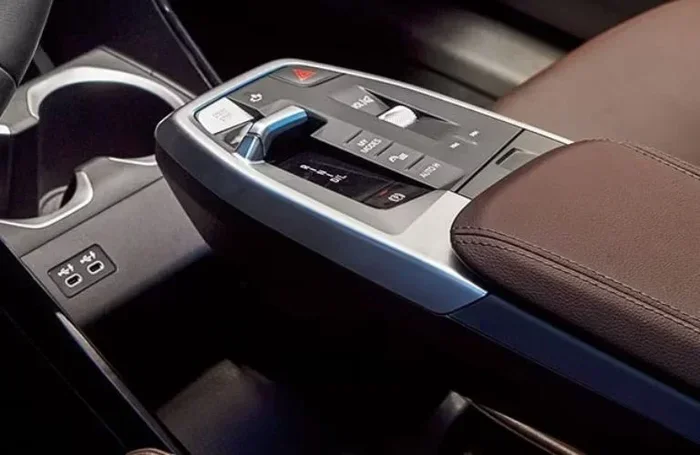
Generation 3: U11 (2023–Present) – The Toggle Switch
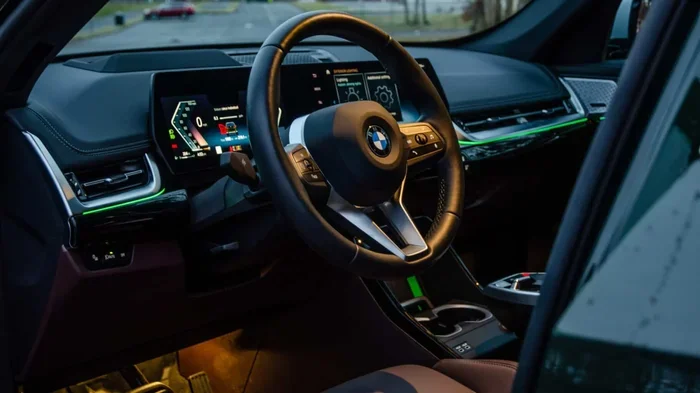
The current, third-generation X1 (including the iX1 electric) features a minimalist toggle switch on the center console, integrated into the new “floating” armrest design. It is a small rocker switch. You tap it up for Reverse, down for Drive, and press the P button on the very top for Park. It is fully electronic (shift-by-wire) with no mechanical linkage to the transmission.
Step-by-Step: How to Put BMW X1 in Park (Current Gen U11 / iX1)
If you drive a 2023 or newer X1, follow this exact sequence. The toggle switch is small and located on the driver’s side of the center console cup holders.
Visual guide about BMW X1 gear selector closeup
Image source: d2ivfcfbdvj3sm.cloudfront.net
- Bring the vehicle to a complete stop. Keep your foot firmly on the brake pedal.
- Locate the toggle switch. It is the small rectangular rocker on the console.
- Press the ‘P’ button on top of the toggle. Do not just rock the switch; there is a distinct button on the very top face of the stalk labeled P. Press it firmly once.
- Verify on the instrument cluster. Look at your digital driver display (behind the steering wheel). A large P indicator will illuminate in the gear status area, often turning red or bright white.
- Check the parking brake. The electronic parking brake (EPB) engages automatically when you select Park and switch off the engine. You will see a red (P) symbol with brackets on the dash.
- Press the Start/Stop button. This turns off the engine. If you just want to sit in the car with the climate control on, you can leave the engine running in Park.
Quick Tip: If you open the driver’s door while the car is in Drive or Reverse (and speed is under ~1.5 mph), the X1 will automatically shift to Park as a safety feature. However, never rely on this; always press the P button yourself.
Step-by-Step: How to Put BMW X1 in Park (F39 Gen 2, 2016–2022)
This generation uses the stalk that springs back to center. The Park button is on the side of the stalk.
Visual guide about BMW X1 gear selector closeup
Image source: cdn.bmwblog.com
- Stop completely. Hold the brake pedal down.
- Find the ‘P’ button on the stalk. Look at the left side of the gear selector stalk (facing the driver). There is a concave button marked P.
- Press the side ‘P’ button. Push it in with your thumb.
- Confirm the cluster display. The gear indicator will show P. The stalk itself remains in the center position.
- Engage parking brake (optional but recommended). On this generation, the EPB often engages automatically when the engine is turned off, but you can also pull the EPB switch (located near the shifter) manually to be sure.
- Turn off engine. Press the Start/Stop button.
Step-by-Step: How to Put BMW X1 in Park (E84 Gen 1, 2010–2015)
This works like a traditional car.
Visual guide about BMW X1 gear selector closeup
Image source: formulaimports.com
- Stop the car. Foot on brake.
- Press the release button on the shifter knob. This unlocks the lever.
- Move the lever forward all the way. Push it to the top detent marked P.
- Release the button. The lever locks in Park.
- Apply parking brake. Pull up the manual handbrake lever (located between the seats) or press the electronic parking brake button if equipped (late models).
- Turn off ignition.
The Electronic Parking Brake (EPB) and Auto Hold Explained
Modern BMW X1 models (F39 and U11) use an Electronic Parking Brake. There is no hand lever. This system integrates directly with the Park gear.
How Automatic Engagement Works
When you press the P button on the shifter and then press the Start/Stop button to kill the engine, the EPB clamps the rear brakes automatically. You will hear a distinct whirring sound from the rear of the car—this is normal. The red brake warning light (P) on the dash confirms it is locked.
Manual EPB Operation
You can manually control the parking brake using the switch labeled (P) near the gear selector (or on the lower dashboard on newer models).
- Pull up on the switch to apply the brake manually (light comes on).
- Push down on the switch to release it (light goes off).
- Auto Release: If you start the car, put it in Drive, and press the accelerator, the EPB releases automatically.
Auto Hold vs. Park: Critical Difference
The Auto Hold button (labeled “AUTO H” or a circle with brackets) keeps the car stopped at traffic lights without you holding the brake pedal. It does not put the car in Park. If you unbuckle your seatbelt or open the door with Auto Hold active, the car may switch to Park automatically, but it is not guaranteed in every scenario. Always press the P button when parking and exiting.
Troubleshooting: When Your BMW X1 Won’t Go Into Park
Sometimes technology glitches. Here is what to do if the P indicator won’t light up or the car beeps angrily at you.
Scenario 1: “Vehicle Not in Park” Warning / Continuous Beeping
You press the P button, open the door, and the car screams at you.
- Cause: The transmission did not engage the parking pawl. This happens if you press the button too quickly after stopping, or if the car is on a steep incline and rolled slightly.
- Fix: Keep foot on brake. Press the P button again firmly. Wait for the P symbol on the dash. If on a hill, let the car settle against the parking pawl before turning off engine.
Scenario 2: Shifter Unresponsive / Frozen Display
The toggle or stalk does nothing. The screen is black or frozen.
- Cause: iDrive system crash or 12V battery low voltage.
- Fix: Perform a “hard reboot.” Press and hold the Start/Stop button for 15–20 seconds (foot off brake) until the screen goes black and the BMW logo reappears. Try shifting again.
Scenario 3: Dead 12V Battery (Car Won’t Start / Won’t Shift)
If the 12V battery is dead, the electronic shifter has no power. You cannot move it out of Park, and if it died while driving, you might not get it into Park easily.
- Fix: Jump start the 12V battery terminals under the hood (or in the trunk on older models). Once power is restored, the shifter will work.
- Note: If you need to tow the car and it has no power, you must use the manual parking release (see below).
Scenario 4: Key Fob Not Detected
You are in Park, engine off, but the car beeps “Key not detected” when you lock the door.
- Cause: Weak key fob battery or interference.
- Fix: Hold the key fob against the steering column (near the Start/Stop button) or the center console wireless charging pad (if equipped) to boost signal. Replace the fob battery soon. Finding the right battery for your BMW key fob is easy and cheap.
Emergency Manual Park Release (Tow Mode / Neutral)
If the car has no electrical power (dead 12V battery) and you must move it (e.g., onto a tow truck), you need to put it in Neutral manually. This is not “Park,” but it is the only way to move a dead car.
For F39 (2016–2022) and U11 (2023+)
- Remove the small trim cover on the center console near the shifter (or inside the cupholder area on U11).
- Pull the orange or yellow release lever/strap underneath.
- While holding the release, move the shifter to Neutral (N) position (or toggle the switch to N while holding release).
- The car can now roll freely. Chock the wheels immediately.
Consult your specific owner’s manual for the exact location, as BMW moves this access point slightly between facelifts.
Advanced Parking Features: Making Life Easier
The X1 offers tech that handles the steering, braking, and shifting for you. Understanding these helps you trust the “Park” process.
Parking Assistant (Standard on most trims)
This system scans for parallel or perpendicular spots. Once found, you press the P Assistant button (icon: P with steering wheel). The car takes over steering, acceleration, braking, and shifting between Drive and Reverse. At the end, it shifts to Park automatically and engages the EPB. You just monitor.
Remote Control Parking (Optional / Key Fob)
On equipped models, you can stand outside the car and hold the center button on the key fob (or use the BMW App on your phone) to make the X1 drive slowly forward or backward into a tight garage spot. It stops and engages Park when you release the button.
Surround View & 3D View
Cameras give you a bird’s-eye view. This doesn’t shift the car, but it ensures you are perfectly centered in the bay before you hit that P button.
Common Mistakes to Avoid
Even experienced BMW drivers develop bad habits with electronic shifters. Avoid these errors:
- Mistake 1: Relying on “Auto P” via Door Open. Opening the door to trigger Park wears the door switch and delays the parking pawl engagement. Press the button.
- Mistake 2: Confusing Auto Hold with Park. Auto Hold releases when you press the gas. Park locks the transmission. Never leave the car in Auto Hold and walk away.
- Mistake 3: Not waiting for the ‘P’ light. On the toggle switch (U11), pressing the P button takes a split second to engage. Turn the engine off after you see the light.
- Mistake 4: Forcing the stalk. On F39 models, the stalk springs back. Forcing it forward/back won’t select Park; only the side button does.
- Mistake 5: Ignoring the parking brake on steep hills. While the EPB is strong, on extreme grades, turn the front wheels toward the curb as a backup.
Expert Insight: Why BMW Switched to Electronic Shifters
You might wonder why BMW abandoned the trusty lever. There are three main reasons:
- Space: Removing the mechanical linkage frees up massive center console storage (the “floating” armrest on the U11).
- Safety: Electronic shifters allow “Auto P” logic. The car cannot be left in Drive accidentally if the driver exits. It prevents rollaway accidents.
- Autonomy: For automated parking and future autonomous driving, the computer must control gear selection electronically. A cable-operated lever cannot do this.
It takes about two weeks of daily driving to build muscle memory for the new toggle. Be patient with yourself.
Key Differences: Gas vs. Diesel vs. Electric (iX1) Parking
The procedure for how to put BMW X1 in park is identical across powertrains for a given generation. However, the feel differs:
| Feature | Gas/Diesel (Mild Hybrid) | Electric (iX1 / xDrive30) |
|---|---|---|
| Engine Sound at Stop | Engine may stay running (Auto Start/Stop off) or silence (Auto Start/Stop on) | Complete silence |
| Creep Behavior | Creeps forward in D/R (torque converter feel) | Creeps forward (simulated) or holds via “One Pedal” regen |
| “Ready” State | RPM gauge shows idle | “Ready” light illuminates, no RPM |
| Park Engagement | Mechanical pawl + EPB | Mechanical pawl + EPB (Identical mechanism) |
Note: The iX1 has a “One Pedal Driving” mode (strong regen). If you use this, the car stops completely when you lift off the accelerator. You still must press the P button to lock the transmission and engage the parking brake.
Understanding Your Dashboard Symbols
When you shift to Park, several lights communicate status. Knowing them prevents panic.
- Red ‘P’ in brackets (P): Electronic Parking Brake is APPLIED. Good.
- Red ‘P’ without brackets: Transmission is in Park (Parking Pawl engaged). Good.
- Yellow ‘P’ with wrench: Parking brake malfunction / Service required.
- Green ‘A’ with circle (Auto Hold): Auto Hold is active. Car is held by service brakes, not Park.
- Car on Lift icon: Vehicle lift/Jack mode active (for tire changes). Disables air suspension leveling.
For a full breakdown of every icon, see our guide on what do BMW symbols mean.
Maintaining Your Shifter and Parking System
The electronic shifter is maintenance-free, but the parking brake and transmission need care.
Brake Fluid
The EPB uses the same hydraulic fluid as your brakes. BMW recommends changing brake fluid every 2 years regardless of mileage. Old fluid absorbs water, reducing EPB holding force and risking internal corrosion. Learn about selecting the ideal brake fluid for your BMW model.
Transmission Fluid
The parking pawl lives inside the transmission (8-speed Steptronic or 7-speed DCT on older models). While BMW calls it “lifetime fluid,” many experts suggest a change at 60k–80k miles for longevity, especially if you park on steep hills daily.
Software Updates
BMW frequently releases iDrive/OS updates that refine shifter logic (e.g., faster P engagement, better hill hold). Check for updates via the iDrive menu or the My BMW App monthly.
Quick Tips Cheat Sheet
- Muscle Memory Drill: Sit in driveway. Practice: Brake -> P Button -> Engine Off -> Exit. Repeat 10 times.
- Hill Parking: Brake -> P Button -> EPB Button (manual pull) -> Engine Off -> Wheels turned to curb.
- Car Wash Mode: If going through a conveyor wash, you need Neutral (N). Engine running, brake off, seatbelt on. Press N button (hold on U11 toggle). Do NOT use Park.
- Valet Mode: In iDrive settings, you can limit max speed and lock the glovebox. The shifter works normally.
- Key Fob Battery: Change every 1-2 years. A dead fob prevents locking/arming alarm even if car is in Park.
Comparing X1 Parking to Other BMW Models
If you switch between BMWs, the shifter logic is now unified across the lineup (mostly).
- 3 Series / 5 Series / X3 / X5 (Current Gen): Identical toggle switch (U11/iDrive 9) or stalk (previous gen). Muscle memory transfers perfectly.
- Older BMWs (Pre-2016ish): Traditional lever or early electronic stalk (push forward for D). Different logic.
- EVs (i4, i7, iX): Same toggle/stalk. “Ready” state replaces engine idle.
If you are shopping for a family hauler and need more space, check out our guide on which BMW SUV has three rows (the X1 only has two).
Conclusion
Learning how to put BMW X1 in park is fundamentally simple: Stop, Brake, Press P, Verify, Engine Off. The complexity lies only in the unfamiliar hardware—the toggle switch or the spring-loaded stalk. Once you build the muscle memory to press that dedicated P button rather than hunting for a lever position, it becomes second nature.
Remember the golden rules: always keep your foot on the brake when shifting, wait for the P confirmation on the driver display, and listen for the parking brake motor. If something feels wrong—beeping, warning lights, or a stuck shifter—don’t force it. Use the troubleshooting steps above or call BMW Roadside Assistance.
Your X1 is engineered with multiple redundancies to prevent rollaways. Trust the system, but verify the lights. Now go enjoy that drive, knowing the parking part is handled.
Frequently Asked Questions
Why does my BMW X1 beep when I open the door after parking?
This usually means the car is not fully in Park, the engine is still running, or the key fob is not detected. Check the instrument cluster for a red P symbol. If it shows D or N, press the P button on the shifter again firmly while holding the brake.
Can I put my BMW X1 in Park while the car is still rolling slowly?
You should never do this. The electronic shifter has a safety inhibitor that prevents Park engagement above roughly 1-2 mph (2-3 km/h). If you press the P button while moving faster, it will typically ignore the request or engage the parking brake gently as an emergency stop, which can damage the parking pawl or brake system.
Does the BMW X1 automatically go into Park when I turn off the engine?
On 2016+ models (F39/U11), if you press the Start/Stop button while in Drive or Reverse, the car will automatically shift to Park and engage the EPB. However, BMW strongly advises against relying on this. Always manually press the P button first to ensure the parking pawl engages smoothly before shutdown.
How do I put my BMW X1 in Neutral for a car wash or tow truck?
With the engine running and foot on brake: On the U11 (2023+), hold the toggle switch up (toward Reverse) for about 1-2 seconds until N displays. On the F39 (2016-2022), tap the stalk forward (toward Reverse) briefly—do not hold—to select Neutral. The car must stay running.
What happens if my 12V battery dies while the car is in Park?
The car will remain locked in Park. The electronic parking brake is engaged. You cannot shift to Neutral without power. You must jump-start the 12V battery using the terminals under the hood (or trunk) to release the shifter, or use the manual mechanical release cable located near the shifter (consult owner’s manual for exact location).
Is the ‘P’ button on the shifter the same as the Electronic Parking Brake button?
No. The P button on the shifter engages the transmission parking pawl (mechanical lock inside the gearbox). The EPB switch (labeled P with brackets) engages the rear brake calipers electrically. They work together: pressing the shifter P button then turning off the engine triggers the EPB automatically. You can use the EPB switch manually while driving (emergency brake) or while parked without the engine running.